

Which Facebook Account Type Are Your Loan Officers Using — and Why It Matters for Compliance
A loan officer sets up a Facebook presence to connect with friends & colleagues, communicate with consumers on a more personalized level, all with the ultimate hope of generating leads and referrals. The premise is simple enough. But which type of Facebook account did they create? Has that account, its features, its category, evolved over time?
Facebook was founded in 2004, which means the platform is over 20 years old today. The platform has evolved tremendously and Meta, Facebook & Instagram’s parent company, has spent the past several years in particular quietly, but significantly, restructuring how Facebook accounts work.
As of 2026, there are four (4) distinct account types available, each with different visibility settings, analytics access, advertising capabilities, and admin structures. This is in part due to some legal suits and sessions in front of congress where Facebook was pressed on its consumer privacy protections and how it sells user data. For most users, the differences between account types are a matter of convenience and feature access. For financial institutions, the differences can carry various compliance implications — particularly around advertising oversight, required disclosures, and the ability of your compliance team to actually monitor what’s being posted.
The Four Account Types, Defined
Before getting into the compliance implications, your team needs to understand what each account type actually is — because the distinctions are not always obvious from the outside. There are two (2) main categories of account types: Facebook Personal Profiles & Facebook Business Pages. The four (4) types of accounts within these two (2) categories are as follows:
Facebook Personal Profiles: administrative access cannot be granted and API providers cannot access account data.
-
- Standard Personal Profile: The default Facebook account. Designed for personal use — friends, family, personal updates. Friend connections are capped at 5,000. No advertising tools, no analytics, no category label. Content visibility is controlled through privacy settings, and there is no call-to-action button. This is not the right vehicle for loan officers conducting any business activity and can at times put the account in jeopardy of being shut down as a violation of Facebook’s Terms of Service.
- Professional Mode (Digital Creator Mode): Not a separate account — it’s a toggle applied to an existing personal profile. Introduced broadly in late 2022, professional mode, aka “Digital Creator” Mode, adds a public “Follow” button, analytics access, and monetization eligibility to a standard personal profile. The account still belongs to one individual; there is no multi-admin capability and no integration with Meta Business Suite. For compliance purposes, this is a solo operation by design and is similar to the standard.
Facebook Business Pages: administrative access can be granted and API providers can access account data.
- Business Page: A separate property from the personal profile, fully integrated with Meta Business Suite and Ads Manager. Multiple admins and defined roles are supported. Business pages display category labels, business information (hours, address, phone), call-to-action buttons, and reviews. As of late 2025, Meta explicitly designates business pages as optimized for advertising and lead generation. This is the account type most appropriate for branch pages, institutional accounts, and any loan officer presence running paid promotions.
- Creator Page: Rolled out in December, 2025, the Creator Page is a settings toggle that can be enabled for Facebook Business Pages. It is structurally similar to a business page — separate from the personal account, supports multiple admins, shows “Like / Follow” buttons with a category label. Facebook touts that the distinction here is “optimization” – that Creator Pages are algorithm-tuned for content reach and organic engagement rather than advertising performance. Public figures, journalists, and personality-led content accounts are Meta’s stated target for this type. Unfortunately, Meta has not made this page type publicly visible to outside visitors in a clear, labeled way, so it can be difficult to tell if the setting has been enabled.
Account Recognition Matrix
Telling one account apart from another can be a confusing task. Meta has determined that in order to keep ad revenue flowing, consumer/user engagement with business pages must not falter. In an effort to spark continued engagement, Meta has taken to styling Business Pages more similarly to Personal Accounts than ever before – allowing navigation items like “Education” and “Hobbies”, that were previously a Personal Profile exclusive, to exist on Business Pages as well. The below matrix of features can be utilized when attempting to determine the account type and employee is using.
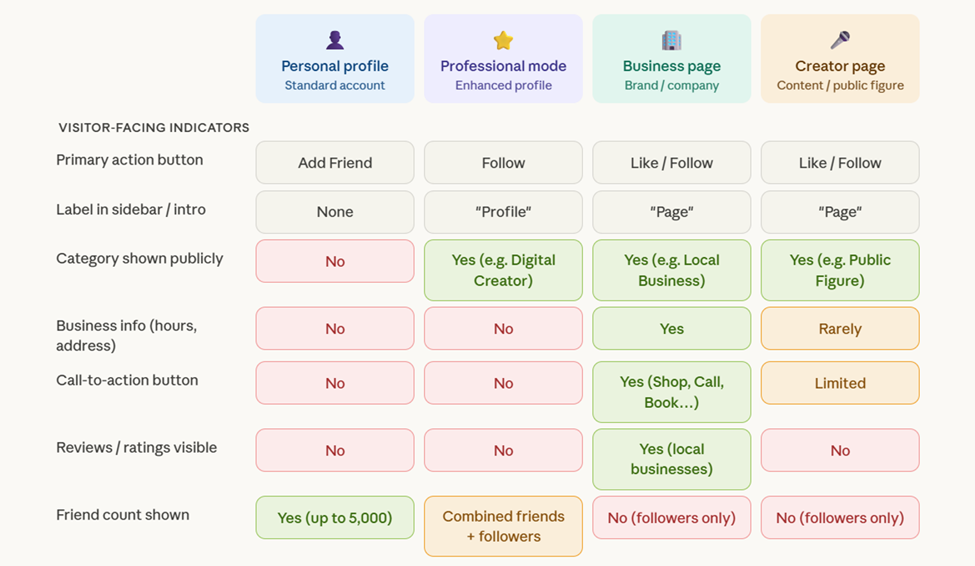
Note: Facebook continually makes updates to the account types and the features displayed with little to no warning to account holders or API customers. This feature matrix may be subject to change.
Why the Account Type Matters to Your Compliance Program
The compliance concern is not abstract. It runs along the practical lines of monitoring access and advertising oversight to ensure examination readiness.
Automated Monitoring Access: If a loan officer is posting business-related content from a personal profile — even in professional mode — your compliance team has no administrative access to that account and cannot access it via an API monitoring provider. Page content cannot be automatically archived to meet regulator record retention requirements, profiles cannot be scanned for required disclaimers, content oversight is non-existent. A business or creator page, by contrast, allows institution’s to automatically monitor pages through an API provider, giving your monitoring tools a structured integration point. This is the operational foundation of any serious social media compliance program.
Business Purpose Advertising Oversight: The FFIEC Social Media Guidance establishes that financial institutions are responsible for the content of their employees’ business-related social media activity. Business-related social media activities are not just relegated to business pages, but can extend to personal profiles if they are used for “business purposes” – such as posting advertisements for services or even just promoting the job role they hold in their employment section. Account types often shape the workarounds employees are likely to attempt.
The profile.php Bug: When Facebook Misclassifies Its Own Accounts
Here is a scenario your compliance team may not have anticipated: a loan officer has done everything right. They set up a business page, not a personal profile. But Facebook’s own API is misclassifying it. There is a known bug in Facebook’s API where the system internally categorizes a business page as a personal profile. These pages do not show in the traditional Facebook Page search.
The tell is in the URL — if a page’s web address contains “profile.php” rather than a named handle or clean page URL, that page has likely been affected. The exact cause is not fully documented nor outlined by Facebook, but the most likely explanation is that the bug was introduced during a period when Facebook was migrating business pages between templates to what is known as the New Pages Experience — a transition that, for some accounts, appears to have corrupted how the page is registered in Meta’s backend.
The practical consequence is significant: pages affected by this bug are typically not discoverable through Facebook’s API and cannot be monitored by third-party compliance platforms. From your monitoring tool’s perspective, the page effectively does not exist — even though it is publicly visible and actively posting content.
For a compliance team that believes it has full visibility into its loan officers’ Facebook activity, this bug creates a blind spot that is easy to miss precisely because nothing looks wrong from the outside. The page is up, content is publishing, and your institution has admin access. What you may not have is any of that content flowing into your monitoring queue.
The Fix Is Straightforward — But Requires Action
The good news is that this bug has a reliable resolution. We have found that if the page holder updates the Username field — the account handle that appears in the page URL — Facebook’s system re-registers the page correctly, removes the “profile.php” segment from the URL, and restores API accessibility. The page becomes discoverable and can be connected to third-party monitoring tools as expected.
This is a one-time fix, but it requires the page owner to take action. It cannot be resolved without the page holder’s involvement, which means your compliance or marketing operations team needs a clear process for identifying affected pages and walking loan officers through the correction. ActiveComply’s Facebook Business Page walkthrough video easily demonstrates how users can make these updates:
ActiveComply video walkthrough — Editing a Facebook Business Page
What Your Compliance Program Should Require
Social media governance isn’t about restricting your loan officers’ ability to market — you want your sales team to feel enabled to go out and meet consumers and serve their communities needs. It’s also about making sure the infrastructure behind that marketing can survive an exam without overly taxing compliance and operations teams with intensive manual labor where monitoring gaps are bound to emerge. Knowing what type of Facebook account your team is using, and confirming that those accounts are actually reachable by your monitoring tools, is where that work starts.